Language pack updated with Russian:
- https://uvnc.eu/download/1800/languages_64.zip
UltraVNC 1.8.X.X - Feedback
Re: UltraVNC 1.8.X.X - Feedback
UltraVNC links (join us on social networks):
- Website: https://uvnc.com/
- Forum: https://forum.uvnc.com/
- GitHub sourcecode: https://github.com/ultravnc/UltraVNC
- Mastodon: https://mastodon.social/@ultravnc
- Bluesky/AT Protocol: https://bsky.app/profile/ultravnc.bsky.social
- Facebook: https://www.facebook.com/ultravnc1
- X/Twitter: https://x.com/ultravnc1
- Reddit community: https://www.reddit.com/r/ultravnc
- OpenHub: https://openhub.net/p/ultravnc
- uvnc2me: https://uvnc2me.com/
- Website: https://uvnc.com/
- Forum: https://forum.uvnc.com/
- GitHub sourcecode: https://github.com/ultravnc/UltraVNC
- Mastodon: https://mastodon.social/@ultravnc
- Bluesky/AT Protocol: https://bsky.app/profile/ultravnc.bsky.social
- Facebook: https://www.facebook.com/ultravnc1
- X/Twitter: https://x.com/ultravnc1
- Reddit community: https://www.reddit.com/r/ultravnc
- OpenHub: https://openhub.net/p/ultravnc
- uvnc2me: https://uvnc2me.com/
Re: UltraVNC 1.8.X.X - Feedback
@proger16: language pack updated with Russian:
- https://uvnc.eu/download/1800/languages_64.zip
"language (ru)" is the visible part in the language selection.
Thanks
- https://uvnc.eu/download/1800/languages_64.zip
"language (ru)" is the visible part in the language selection.
Thanks
UltraVNC links (join us on social networks):
- Website: https://uvnc.com/
- Forum: https://forum.uvnc.com/
- GitHub sourcecode: https://github.com/ultravnc/UltraVNC
- Mastodon: https://mastodon.social/@ultravnc
- Bluesky/AT Protocol: https://bsky.app/profile/ultravnc.bsky.social
- Facebook: https://www.facebook.com/ultravnc1
- X/Twitter: https://x.com/ultravnc1
- Reddit community: https://www.reddit.com/r/ultravnc
- OpenHub: https://openhub.net/p/ultravnc
- uvnc2me: https://uvnc2me.com/
- Website: https://uvnc.com/
- Forum: https://forum.uvnc.com/
- GitHub sourcecode: https://github.com/ultravnc/UltraVNC
- Mastodon: https://mastodon.social/@ultravnc
- Bluesky/AT Protocol: https://bsky.app/profile/ultravnc.bsky.social
- Facebook: https://www.facebook.com/ultravnc1
- X/Twitter: https://x.com/ultravnc1
- Reddit community: https://www.reddit.com/r/ultravnc
- OpenHub: https://openhub.net/p/ultravnc
- uvnc2me: https://uvnc2me.com/

Re: UltraVNC 1.8.X.X - Feedback
@proger16: "Pусский" instead of "language (ru)" will be good?
UltraVNC links (join us on social networks):
- Website: https://uvnc.com/
- Forum: https://forum.uvnc.com/
- GitHub sourcecode: https://github.com/ultravnc/UltraVNC
- Mastodon: https://mastodon.social/@ultravnc
- Bluesky/AT Protocol: https://bsky.app/profile/ultravnc.bsky.social
- Facebook: https://www.facebook.com/ultravnc1
- X/Twitter: https://x.com/ultravnc1
- Reddit community: https://www.reddit.com/r/ultravnc
- OpenHub: https://openhub.net/p/ultravnc
- uvnc2me: https://uvnc2me.com/
- Website: https://uvnc.com/
- Forum: https://forum.uvnc.com/
- GitHub sourcecode: https://github.com/ultravnc/UltraVNC
- Mastodon: https://mastodon.social/@ultravnc
- Bluesky/AT Protocol: https://bsky.app/profile/ultravnc.bsky.social
- Facebook: https://www.facebook.com/ultravnc1
- X/Twitter: https://x.com/ultravnc1
- Reddit community: https://www.reddit.com/r/ultravnc
- OpenHub: https://openhub.net/p/ultravnc
- uvnc2me: https://uvnc2me.com/

Re: UltraVNC 1.8.X.X - Feedback
@RudiDeVos
I will test it
Yes, it's OK
I will test it
Re: UltraVNC 1.8.X.X - Feedback
Ok, I tested UltraVNC Viewer.
1) Some resources are missing from .rc, in particular I couldn't find these:

2) The text labels are critically short, even though there's plenty of room between them and other elements in most cases. Perhaps there's a way to make them as long as possible? This would make translation easier for more than just me. You could also use a single-column list of options in the settings where possible:


3) If you call the FOLDER deletion dialog, it will say "Confirm deletion of FILE"; the resource with the text "Confirm deletion of FOLDER" is not used.
4) I also discovered the following behavior:
If you invoke the file/folder deletion dialog, then when you close the dialog with a red cross, the delete action is performed, as if the user answered "Yes," rather than canceling, which would be more logical.
1) Some resources are missing from .rc, in particular I couldn't find these:
2) The text labels are critically short, even though there's plenty of room between them and other elements in most cases. Perhaps there's a way to make them as long as possible? This would make translation easier for more than just me. You could also use a single-column list of options in the settings where possible:
3) If you call the FOLDER deletion dialog, it will say "Confirm deletion of FILE"; the resource with the text "Confirm deletion of FOLDER" is not used.
4) I also discovered the following behavior:
If you invoke the file/folder deletion dialog, then when you close the dialog with a red cross, the delete action is performed, as if the user answered "Yes," rather than canceling, which would be more logical.
Re: UltraVNC 1.8.X.X - Feedback
Same with UltraVNC Server:
- some lines are apparently missing from the .rc file
- text labels often don't fit, and it's not always possible to translate them beautifully and shorten them sufficiently

- some lines are apparently missing from the .rc file
- text labels often don't fit, and it's not always possible to translate them beautifully and shorten them sufficiently
Re: UltraVNC 1.8.X.X - Feedback
Fixed in the flowing commit.
UltraVNC Viewer textbox size:
- https://github.com/ultravnc/UltraVNC/co ... c1ad3ca617
UltraVNC Server textbox size:
- https://github.com/ultravnc/UltraVNC/co ... b304634ba2
UltraVNC Viewer textbox size:
- https://github.com/ultravnc/UltraVNC/co ... c1ad3ca617
UltraVNC Server textbox size:
- https://github.com/ultravnc/UltraVNC/co ... b304634ba2
Re: UltraVNC 1.8.X.X - Feedback
@RudiDeVos: More about FT:
- If you select multiple LOCAL folders at once and click "Delete", you'll see "Only one folder can be renamed."
- If you select multiple REMOTE folders at once and click "Receive", only one is copied.
- If you copy a REMOTE folder that already exists LOCALLY, no prompts are displayed; the folder simply appears as UVNCTMP0B11F539 after copying. The same applies when copying in the opposite direction.
- If you select multiple LOCAL folders at once and click "Delete", you'll see "Only one folder can be renamed."
- If you select multiple REMOTE folders at once and click "Receive", only one is copied.
- If you copy a REMOTE folder that already exists LOCALLY, no prompts are displayed; the folder simply appears as UVNCTMP0B11F539 after copying. The same applies when copying in the opposite direction.
Re: UltraVNC 1.8.X.X - Feedback
Just started a deploy of the latest but now it seems the server wants locally encrypted passwords. We push a config copy of the ini with a set password but install ignores it.
Re: UltraVNC 1.8.X.X - Feedback
Perhaps this is the issue: Release summary - May 2026
⚠ Configuration path changed: ultravnc.ini is now stored in the GOOD standard Windows locations: %AppData%\UltraVNC\ for regular users and %ProgramData%\UltraVNC\ when Running as a Service or with admin rights.
If you create an empty file named ultravnc.portable in the same folder as winvnc.exe, then the Server reads the .ini from the same folder (old behavior)
See:
- https://uvnc.com/downloads/ultravnc/165 ... 8-2-2.html
⚠ Configuration path changed: ultravnc.ini is now stored in the GOOD standard Windows locations: %AppData%\UltraVNC\ for regular users and %ProgramData%\UltraVNC\ when Running as a Service or with admin rights.
If you create an empty file named ultravnc.portable in the same folder as winvnc.exe, then the Server reads the .ini from the same folder (old behavior)
See:
- https://uvnc.com/downloads/ultravnc/165 ... 8-2-2.html
UltraVNC links (join us on social networks):
- Website: https://uvnc.com/
- Forum: https://forum.uvnc.com/
- GitHub sourcecode: https://github.com/ultravnc/UltraVNC
- Mastodon: https://mastodon.social/@ultravnc
- Bluesky/AT Protocol: https://bsky.app/profile/ultravnc.bsky.social
- Facebook: https://www.facebook.com/ultravnc1
- X/Twitter: https://x.com/ultravnc1
- Reddit community: https://www.reddit.com/r/ultravnc
- OpenHub: https://openhub.net/p/ultravnc
- uvnc2me: https://uvnc2me.com/
- Website: https://uvnc.com/
- Forum: https://forum.uvnc.com/
- GitHub sourcecode: https://github.com/ultravnc/UltraVNC
- Mastodon: https://mastodon.social/@ultravnc
- Bluesky/AT Protocol: https://bsky.app/profile/ultravnc.bsky.social
- Facebook: https://www.facebook.com/ultravnc1
- X/Twitter: https://x.com/ultravnc1
- Reddit community: https://www.reddit.com/r/ultravnc
- OpenHub: https://openhub.net/p/ultravnc
- uvnc2me: https://uvnc2me.com/
Re: UltraVNC 1.8.X.X - Feedback
@VersusBG: Manual merged all except MSI.
Currently, I use a MSI Wrapper around the Inno Setup, so I don't need to maintain MSI and Inno Setup.
The MSI Wrapper also takeover all Inno Setup settings that are mssing in the MSI via a deployment project.
Currently, I use a MSI Wrapper around the Inno Setup, so I don't need to maintain MSI and Inno Setup.
The MSI Wrapper also takeover all Inno Setup settings that are mssing in the MSI via a deployment project.
UltraVNC links (join us on social networks):
- Website: https://uvnc.com/
- Forum: https://forum.uvnc.com/
- GitHub sourcecode: https://github.com/ultravnc/UltraVNC
- Mastodon: https://mastodon.social/@ultravnc
- Bluesky/AT Protocol: https://bsky.app/profile/ultravnc.bsky.social
- Facebook: https://www.facebook.com/ultravnc1
- X/Twitter: https://x.com/ultravnc1
- Reddit community: https://www.reddit.com/r/ultravnc
- OpenHub: https://openhub.net/p/ultravnc
- uvnc2me: https://uvnc2me.com/
- Website: https://uvnc.com/
- Forum: https://forum.uvnc.com/
- GitHub sourcecode: https://github.com/ultravnc/UltraVNC
- Mastodon: https://mastodon.social/@ultravnc
- Bluesky/AT Protocol: https://bsky.app/profile/ultravnc.bsky.social
- Facebook: https://www.facebook.com/ultravnc1
- X/Twitter: https://x.com/ultravnc1
- Reddit community: https://www.reddit.com/r/ultravnc
- OpenHub: https://openhub.net/p/ultravnc
- uvnc2me: https://uvnc2me.com/
Re: UltraVNC 1.8.X.X - Feedback
Uninstalling an EXEMSI installation remotely with no GUI is not possible as the .msi uninstall command will just start the unins000.exe user interface.
so any commands for remote uninstall will fail
like those examples:
----
-------
The only way to uninstall the program which is installed via EXEMSI is to call unins000.exe first (Invoke-Command) and then run msiexec to clear the leftovers of the wrapped installed (msi and programs)
so any commands for remote uninstall will fail
like those examples:
----
Code: Select all
MsiExec.exe /X BD73903D-C694-4358-8F07-E71ABC89368F
msiexec.exe /x UltraVNC_1640_x64_Setup.msi
Code: Select all
$app = Get-WmiObject -Class Win32_Product | Where-Object { $_.Name -match "UltraVNC" }
$app.Uninstall()
Code: Select all
Get-Package -Name *UltraVNC* | Uninstall-PackageThe only way to uninstall the program which is installed via EXEMSI is to call unins000.exe first (Invoke-Command) and then run msiexec to clear the leftovers of the wrapped installed (msi and programs)
Code: Select all
PS C:\> Get-Package -Name *UltraVNC*

Name                           Version          Source                           ProviderName
----                           -------          ------                           ------------
UltraVNC - UNREGISTERED - W... 1.6.4.0                                           msi
UltraVNC                       1.6.4.0                                           Programs
Code: Select all
PS C:\> & "C:\Program Files\uvnc bvba\UltraVNC\unins000.exe" /VERYSILENT
PS C:\> Get-Package -Name *UltraVNC*

Name                           Version          Source                           ProviderName
----                           -------          ------                           ------------
UltraVNC - UNREGISTERED - W... 1.6.4.0                                           msi


PS C:\> $app = Get-WmiObject -Class Win32_Product | Where-Object { $_.Name -match "UltraVNC" }
PS C:\> $app.Uninstall()


__GENUS          : 2
__CLASS          : __PARAMETERS
__SUPERCLASS     :
__DYNASTY        : __PARAMETERS
__RELPATH        :
__PROPERTY_COUNT : 1
__DERIVATION     : {}
__SERVER         :
__NAMESPACE      :
__PATH           :
ReturnValue      : 0
PSComputerName   :


PS C:\> Get-Package -Name *UltraVNC*Re: UltraVNC 1.8.X.X - Feedback
UltraVNC_1823_x64_Setup.exe installs expired certificate into:
C:\Program Files\uvnc bvba\UltraVnc\ultravnc.cer
C:\Program Files\uvnc bvba\UltraVnc\ultravnc.cer
Re: UltraVNC 1.8.X.X - Feedback
Hello all,
UltraVNC 1.8.2.3 and 1.8.2.4 released, please update, test, and do feedback.
UltraVNC 1.8.2.3 and 1.8.2.4 released, please update, test, and do feedback.
UltraVNC links (join us on social networks):
- Website: https://uvnc.com/
- Forum: https://forum.uvnc.com/
- GitHub sourcecode: https://github.com/ultravnc/UltraVNC
- Mastodon: https://mastodon.social/@ultravnc
- Bluesky/AT Protocol: https://bsky.app/profile/ultravnc.bsky.social
- Facebook: https://www.facebook.com/ultravnc1
- X/Twitter: https://x.com/ultravnc1
- Reddit community: https://www.reddit.com/r/ultravnc
- OpenHub: https://openhub.net/p/ultravnc
- uvnc2me: https://uvnc2me.com/
- Website: https://uvnc.com/
- Forum: https://forum.uvnc.com/
- GitHub sourcecode: https://github.com/ultravnc/UltraVNC
- Mastodon: https://mastodon.social/@ultravnc
- Bluesky/AT Protocol: https://bsky.app/profile/ultravnc.bsky.social
- Facebook: https://www.facebook.com/ultravnc1
- X/Twitter: https://x.com/ultravnc1
- Reddit community: https://www.reddit.com/r/ultravnc
- OpenHub: https://openhub.net/p/ultravnc
- uvnc2me: https://uvnc2me.com/

Re: UltraVNC 1.8.X.X - Feedback
Just installed 1.8.2.4. In Spanish translation some texts appear incomplete.
Thanks for your support.
Server
There is not enough space with the button. "Contraseña de solo lectura"
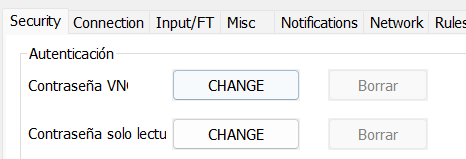
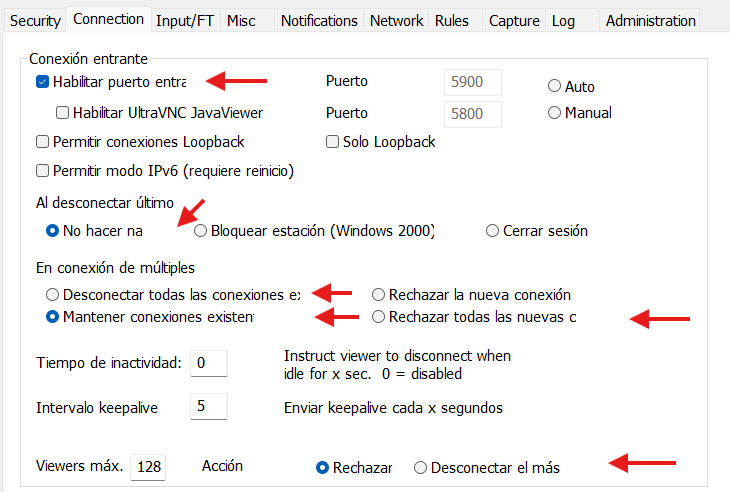
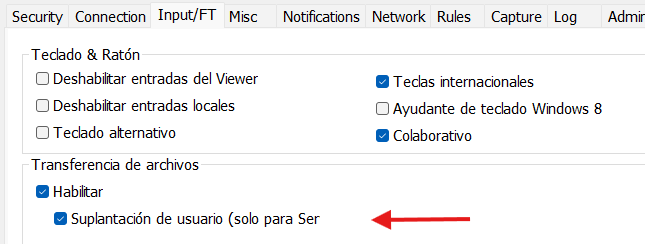
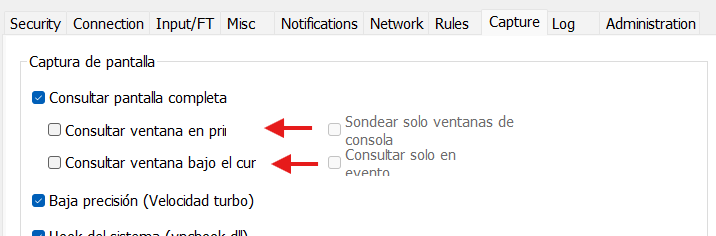
Viewer
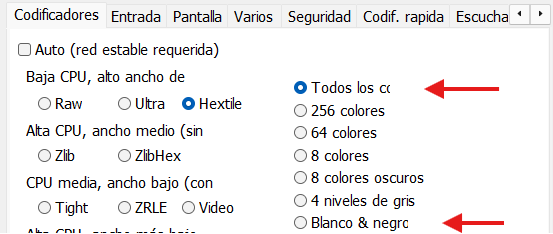
Thanks for your support.
Server
There is not enough space with the button. "Contraseña de solo lectura"
Viewer
Re: UltraVNC 1.8.X.X - Feedback
@Lucent
@Ludovic
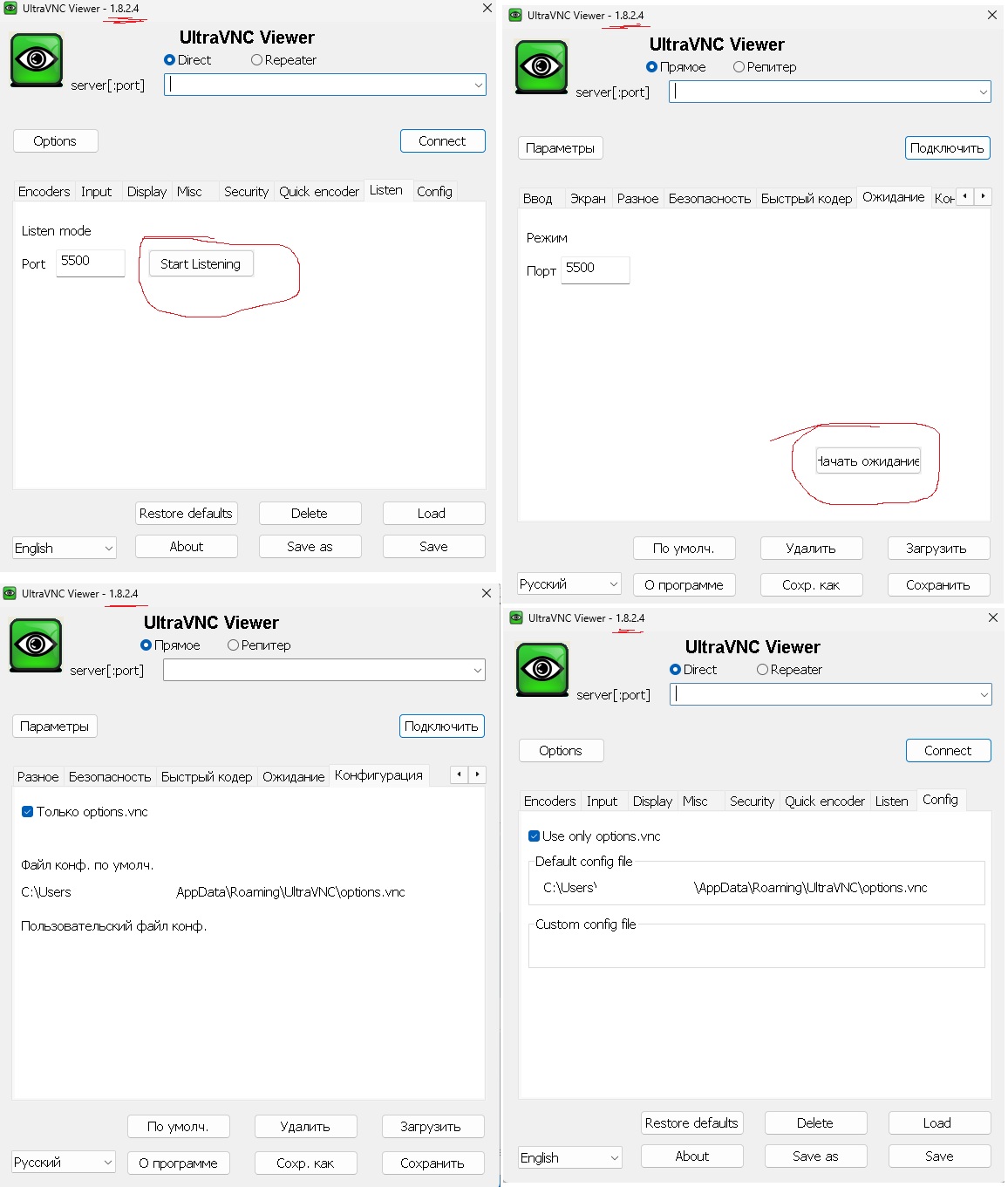
Same with Russian
After increasing the layouts it became better, but some of the text still doesn't fit.


@Ludovic
Same with Russian
After increasing the layouts it became better, but some of the text still doesn't fit.
Re: UltraVNC 1.8.X.X - Feedback
Ohhh my bad. Each language is using they own resource file and the changes in EN version doesn't reflect other languages GUI.
So the same change must be done for every language not only for the EN.
I will post a new pull request in GitHub and try to fix them.
Is it possible to add .resx and include all strings?
- https://devblogs.microsoft.com/visualst ... x-manager/
So the same change must be done for every language not only for the EN.
I will post a new pull request in GitHub and try to fix them.
Is it possible to add .resx and include all strings?
- https://devblogs.microsoft.com/visualst ... x-manager/
Re: UltraVNC 1.8.X.X - Feedback
@RudiDeVos, @Ludovic: I've already written about this before:
- If you call the FOLDER deletion dialog, it will say "Confirm deletion of FILE"; the resource with the text "Confirm deletion of FOLDER" is not used.
- I also discovered the following behavior: If you invoke the file/folder deletion dialog, then when you close the dialog with a red cross, the delete action is performed, as if the user answered "Yes", rather than canceling, which would be more logical.
In more:proger16 wrote: 2026-06-02 11:08 @RudiDeVos: More about FT:
- If you select multiple LOCAL folders at once and click "Delete", you'll see "Only one folder can be renamed."
- If you select multiple REMOTE folders at once and click "Receive", only one is copied.
- If you copy a REMOTE folder that already exists LOCALLY, no prompts are displayed; the folder simply appears as UVNCTMP0B11F539 after copying. The same applies when copying in the opposite direction.
- If you call the FOLDER deletion dialog, it will say "Confirm deletion of FILE"; the resource with the text "Confirm deletion of FOLDER" is not used.
- I also discovered the following behavior: If you invoke the file/folder deletion dialog, then when you close the dialog with a red cross, the delete action is performed, as if the user answered "Yes", rather than canceling, which would be more logical.
Re: UltraVNC 1.8.X.X - Feedback
@VersusBG: ResX Resource Manager is designed for .NET .resx files, not native C++ .rc files. So you can’t directly open or translate .rc files with it.
Will not work.
I imported the changes (pos/size) from EN in all other .rc files (automated).
Will not work.
I imported the changes (pos/size) from EN in all other .rc files (automated).
UltraVNC links (join us on social networks):
- Website: https://uvnc.com/
- Forum: https://forum.uvnc.com/
- GitHub sourcecode: https://github.com/ultravnc/UltraVNC
- Mastodon: https://mastodon.social/@ultravnc
- Bluesky/AT Protocol: https://bsky.app/profile/ultravnc.bsky.social
- Facebook: https://www.facebook.com/ultravnc1
- X/Twitter: https://x.com/ultravnc1
- Reddit community: https://www.reddit.com/r/ultravnc
- OpenHub: https://openhub.net/p/ultravnc
- uvnc2me: https://uvnc2me.com/
- Website: https://uvnc.com/
- Forum: https://forum.uvnc.com/
- GitHub sourcecode: https://github.com/ultravnc/UltraVNC
- Mastodon: https://mastodon.social/@ultravnc
- Bluesky/AT Protocol: https://bsky.app/profile/ultravnc.bsky.social
- Facebook: https://www.facebook.com/ultravnc1
- X/Twitter: https://x.com/ultravnc1
- Reddit community: https://www.reddit.com/r/ultravnc
- OpenHub: https://openhub.net/p/ultravnc
- uvnc2me: https://uvnc2me.com/
Re: UltraVNC 1.8.X.X - Feedback
Please replace the .dll files to test:
- https://uvnc.eu/download/1800/languages1824.zip
This is auto updated, based on estimated size of a text string.
Instead of using the EN sizes, they were recalculated based on translated text.
I can't verify each dialog for each language manual.
Please check.
- https://uvnc.eu/download/1800/languages1824.zip
This is auto updated, based on estimated size of a text string.
Instead of using the EN sizes, they were recalculated based on translated text.
I can't verify each dialog for each language manual.
Please check.
UltraVNC links (join us on social networks):
- Website: https://uvnc.com/
- Forum: https://forum.uvnc.com/
- GitHub sourcecode: https://github.com/ultravnc/UltraVNC
- Mastodon: https://mastodon.social/@ultravnc
- Bluesky/AT Protocol: https://bsky.app/profile/ultravnc.bsky.social
- Facebook: https://www.facebook.com/ultravnc1
- X/Twitter: https://x.com/ultravnc1
- Reddit community: https://www.reddit.com/r/ultravnc
- OpenHub: https://openhub.net/p/ultravnc
- uvnc2me: https://uvnc2me.com/
- Website: https://uvnc.com/
- Forum: https://forum.uvnc.com/
- GitHub sourcecode: https://github.com/ultravnc/UltraVNC
- Mastodon: https://mastodon.social/@ultravnc
- Bluesky/AT Protocol: https://bsky.app/profile/ultravnc.bsky.social
- Facebook: https://www.facebook.com/ultravnc1
- X/Twitter: https://x.com/ultravnc1
- Reddit community: https://www.reddit.com/r/ultravnc
- OpenHub: https://openhub.net/p/ultravnc
- uvnc2me: https://uvnc2me.com/
Re: UltraVNC 1.8.X.X - Feedback
@RudiDeVos: RU: Nothing has changed except for a couple of labels and the "Start Listening" button in the Viewer.
If I could, I'd adjust the size and position manually, but I don't know how.
Especially since the translation itself needs to be corrected—some abbreviations could be removed (it's clear there's enough space on the form), and others could be reworded.
If I could, I'd adjust the size and position manually, but I don't know how.
Especially since the translation itself needs to be corrected—some abbreviations could be removed (it's clear there's enough space on the form), and others could be reworded.

Re: UltraVNC 1.8.X.X - Feedback
@Ludovic, @RudiDeVos, I have done some basic tests and here are a couple of observations I did not track down very detailled:Ludovic wrote: 2026-06-15 19:37 UltraVNC 1.8.2.3 and 1.8.2.4 released, please update, test, and do feedback.
- Installation folder seems to lack ultravnc.cer certificate which is used to sign the Mirror Driver
- Evaluation of path to ini file in portable mode seems "odd"
As described I am running a custom service (e.g. support_service) and I had some issues placing ultravnc.ini properly:
- When placed in service installation folder it would only be used if there is no ultravnc.ini in %&ProgramData%\UltraVNC folder. However if the user at any time installs any other UltraVNC instance the ini likely exists there and also the service will stop using the ini in its installation folder.
- I tried deplying ultravnc.portable file in installation folder which is supposed to hard-lock the ultravnc.ini location to the deployment folder. I noticed in this case UltraVNC is looking for an INI file named like the service (eg. remote_support.ini). So I placed remote_support.ini in the deployment folder. However still UltraVNC seems to require ultravnc.ini to exist. So I need both "ultravnc.ini" and "remote_support.ini" in the deployment folder for it to work correctly and avoid WinVNC.exe to open the settings panel on service launch also claiming no password is set.
Re: UltraVNC 1.8.X.X - Feedback
@SkyBeam: .cer was removed as people complained a old certificat was added, I will add it back.
UltraVNC links (join us on social networks):
- Website: https://uvnc.com/
- Forum: https://forum.uvnc.com/
- GitHub sourcecode: https://github.com/ultravnc/UltraVNC
- Mastodon: https://mastodon.social/@ultravnc
- Bluesky/AT Protocol: https://bsky.app/profile/ultravnc.bsky.social
- Facebook: https://www.facebook.com/ultravnc1
- X/Twitter: https://x.com/ultravnc1
- Reddit community: https://www.reddit.com/r/ultravnc
- OpenHub: https://openhub.net/p/ultravnc
- uvnc2me: https://uvnc2me.com/
- Website: https://uvnc.com/
- Forum: https://forum.uvnc.com/
- GitHub sourcecode: https://github.com/ultravnc/UltraVNC
- Mastodon: https://mastodon.social/@ultravnc
- Bluesky/AT Protocol: https://bsky.app/profile/ultravnc.bsky.social
- Facebook: https://www.facebook.com/ultravnc1
- X/Twitter: https://x.com/ultravnc1
- Reddit community: https://www.reddit.com/r/ultravnc
- OpenHub: https://openhub.net/p/ultravnc
- uvnc2me: https://uvnc2me.com/
Re: UltraVNC 1.8.X.X - Feedback
@SkyBeam: Where is the ultravnc.ini folder?
ultravnc.portable exists: <exe folder>\ultravnc.ini
No marker, running as Admin/Service: %ProgramData%\UltraVNC\ultravnc.ini
No marker, non-Admin (user config exists): %LocalAppData%\UltraVNC\ultravnc.ini
No marker, non-Admin (fallback): %ProgramData%\UltraVNC\ultravnc.ini
Looking deeper:
when service_name is changed -> .ini is indeed service_name.ini
ultravnc.portable exists: <exe folder>\service_name.ini
No marker, running as Service: %ProgramData%\UltraVNC\service_name.ini
The change of the .ini file to the same as the Service name was added a long time ago as request.
When the service start, he reads ultravnc.ini for a few parameters ( kickrdp, clearconsole, rdpmode, service_commandline)
This has always been like this, even before the ini file was moved and portable was added.
This is a little bug, that exist for many years, forgot to change when servicename.ini was added
WIll change it so that the inital service also use the servicename.ini
ultravnc.portable exists: <exe folder>\ultravnc.ini
No marker, running as Admin/Service: %ProgramData%\UltraVNC\ultravnc.ini
No marker, non-Admin (user config exists): %LocalAppData%\UltraVNC\ultravnc.ini
No marker, non-Admin (fallback): %ProgramData%\UltraVNC\ultravnc.ini
Looking deeper:
when service_name is changed -> .ini is indeed service_name.ini
ultravnc.portable exists: <exe folder>\service_name.ini
No marker, running as Service: %ProgramData%\UltraVNC\service_name.ini
The change of the .ini file to the same as the Service name was added a long time ago as request.
When the service start, he reads ultravnc.ini for a few parameters ( kickrdp, clearconsole, rdpmode, service_commandline)
This has always been like this, even before the ini file was moved and portable was added.
This is a little bug, that exist for many years, forgot to change when servicename.ini was added
WIll change it so that the inital service also use the servicename.ini
UltraVNC links (join us on social networks):
- Website: https://uvnc.com/
- Forum: https://forum.uvnc.com/
- GitHub sourcecode: https://github.com/ultravnc/UltraVNC
- Mastodon: https://mastodon.social/@ultravnc
- Bluesky/AT Protocol: https://bsky.app/profile/ultravnc.bsky.social
- Facebook: https://www.facebook.com/ultravnc1
- X/Twitter: https://x.com/ultravnc1
- Reddit community: https://www.reddit.com/r/ultravnc
- OpenHub: https://openhub.net/p/ultravnc
- uvnc2me: https://uvnc2me.com/
- Website: https://uvnc.com/
- Forum: https://forum.uvnc.com/
- GitHub sourcecode: https://github.com/ultravnc/UltraVNC
- Mastodon: https://mastodon.social/@ultravnc
- Bluesky/AT Protocol: https://bsky.app/profile/ultravnc.bsky.social
- Facebook: https://www.facebook.com/ultravnc1
- X/Twitter: https://x.com/ultravnc1
- Reddit community: https://www.reddit.com/r/ultravnc
- OpenHub: https://openhub.net/p/ultravnc
- uvnc2me: https://uvnc2me.com/
Re: UltraVNC 1.8.X.X - Feedback
The certificate is old, but also the mirror driver is signed with this old certificate. So the old certificate is needed to add it to the trust store. No matter how old it is. Unless the mirror driver is re-signed with a new certificate of course.RudiDeVos wrote: 2026-06-17 19:13 @SkyBeam: .cer was removed as people complained a old certificat was added, I will add it back.
Thanks for re-adding it, saves me from having to extract it from the CAB file - and will (hopefilly) automatically work if the cert is ever updated and therefore both the signature as well as the included ultravnc.cer is updated at the same time.
Re: UltraVNC 1.8.X.X - Feedback
Actually my setup is as follows:
- "%ProgramFiles%\RemoteSupport" is the deployment folder
- A serviced named remote_support_service is created pointing to %ProgramFiles%\RemoteSupport\winvnc.exe
- %ProgramFiles%\RemoteSupport\ultravnc.portable exists
So bottom line is we just talk about this little glitch that some parameters were still read from ultravnc.ini instead of servicename.ini. So I can drop ultravnc.ini in the future. Thanks!RudiDeVos wrote: 2026-06-17 21:51 When the service start, he reads ultravnc.ini for a few parameters ( kickrdp, clearconsole, rdpmode, service_commandline)
This has always been like this, even before the ini file was moved and portable was added.
This is a little bug, that exist for many years, forgot to change when servicename.ini was added
WIll change it so that the inital service also use the servicename.ini
Here's more about my setup and experience leading to above conclusion.
This is weird as I have seen my service looking for remote_support_service.ini (remember that my service is not called ultravnc but "remote_support_service".
When launching the remote_support_service it will pop-up the settings screen and none of my ini settings are applied (e.g. hide tray icon, show indicator frame, set password).
Then I renamed ultravnc.ini to remote_support_service.ini and it still did not work on first launch. Only after placing a copy of both (ultravnc.ini AND remote_support_service.ini) it would launch perfectly fine.
I think there is a bug in this listing. As of my understanding one of the items you list above should refer to %ProgramFiles% resp. the winvnc.exe folder from which it is launched. I think this is the last line (fallback).RudiDeVos wrote: 2026-06-17 21:51 No marker, running as Admin/Service: %ProgramData%\UltraVNC\ultravnc.ini
No marker, non-Admin (user config exists): %LocalAppData%\UltraVNC\ultravnc.ini
No marker, non-Admin (fallback): %ProgramData%\UltraVNC\ultravnc.ini
So I was relying on the service to use the fallback of "%ProgramFiles%\Remote Support\ultravnc.ini" but I face issues in case any user on that machine is at any point in time installing UltraVNC. Even if uninstalled it would still place %ProgramData%\UltraVNC\ultravnc.ini and my service would pick it up instead of sticking to the ini file at %ProgramFiles%\Remote Support\ultravnc.ini.
So I tried the ultravnc.portable marker case and assumed it would ALWAYS use the INI that came with the application (%ProgramFiles%\Remote Support\ultravnc.ini).
And it does - sort of. Despite requiring me to place ultravnc.ini and remote_support_service.ini both in the folder.
That's what I assumed as well but it wouldn't actually fully pick up service_name.ini and still only work if also ultravnc.ini (copy of service_name.ini) exists. Else it will show the settings panel on service launch.RudiDeVos wrote: 2026-06-17 21:51 Looking deeper:
when service_name is changed -> .ini is indeed service_name.ini
ultravnc.portable exists: <exe folder>\service_name.ini
My use-case is with marker, custom service name. So it should read only "%ProgramFiles%\Remote Support\remote_support_service.ini" but somehow this does case does not work as expected. As it starts the settings panel like no ini file has been read.RudiDeVos wrote: 2026-06-17 21:51 No marker, running as Service: %ProgramData%\UltraVNC\service_name.ini
And I like it as it allows me to install multiple services with different configurations even sharing the same installation folder.RudiDeVos wrote: 2026-06-17 21:51 The change of the .ini file to the same as the Service name was added a long time ago as request.
Re: UltraVNC 1.8.X.X - Feedback
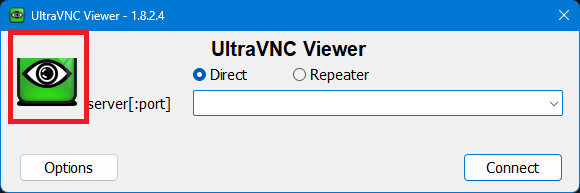
Nothing major, but when I choose a server from the drop-down, the vnc icon get cut off.