After more 2 000 000 (two million) views on forum for 1.5.0.x development versions... and 1.6.1.0, 1.6.3.0-dev versions
A new stable version, UltraVNC 1.6.4.0 and UltraVNC SC 1.6.4.0 have been released: https://forum.uvnc.com/viewtopic.php?t=38095
Feedback is always welcome

2025-12-05: Celebrating the 23th anniversary of the UltraVNC (26th anniversary since the laying of the foundation stone): https://forum.uvnc.com/viewtopic.php?t=38130

2025-12-03: Could you please complete our poll/survey? Renaming UltraVNC files and service to be more clear: https://forum.uvnc.com/viewtopic.php?t=38128
There was a problem to vote, it is solved now! Thanks in advance!

2025-12-02: We need help: English Wikipedia UltraVNC page has been requested to deletion: https://forum.uvnc.com/viewtopic.php?t=38127
Any help is welcome to improve the UltraVNC page and/or to comment on the Wikipedia Talk page

2025-05-06: Forum password change request: https://forum.uvnc.com/viewtopic.php?t=38078

2023-09-21: Important: Please update to latest version before to create a reply, a topic or an issue: https://forum.uvnc.com/viewtopic.php?t=37864

Development: UltraVNC development is always here... Any help is welcome
Feedback is welcome

Join us on social networks and share our announcements:
- Website: https://uvnc.com/
- GitHub: https://github.com/ultravnc
- Mastodon: https://mastodon.social/@ultravnc
- Bluesky/AT Protocol: https://bsky.app/profile/ultravnc.bsky.social
- Facebook: https://www.facebook.com/ultravnc1
- X/Twitter: https://x.com/ultravnc1
- Reddit community: https://www.reddit.com/r/ultravnc
- OpenHub: https://openhub.net/p/ultravnc

vncviewer.exe (Client-Modus) with connect parms for login (User, Password) for MS-Logon II

Any features you would like to see in UltraVNC? Propose it here
Post Reply
Markus4711
Posts: 1
Joined: 2022-05-23 09:26

vncviewer.exe (Client-Modus) with connect parms for login (User, Password) for MS-Logon II

Post by Markus4711 »

I'm using in Batch-Files the following comannd:
vncviewer.exe -autoscaling -autoreconect 30 -connect %Computer%::5900 -quickoption 3 -dsmplugin SecureVNCPlugin64.dsm

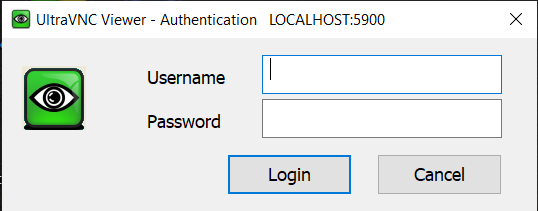
It works fine for me and returns the windows
Image

Register with User and Password and the connection is succesful.


I'm looking for command parms vor the vncviewer.exe to automate this looking. But it doesn't exist. For Example:
vncviewer.exe -autoscaling -autoreconect 30 -connect %Computer%::5900 -quickoption 3 -dsmplugin SecureVNCPlugin64.dsm -msuser loginuser -mpass mypass


thanks a lot
Markus
Broiler787
Posts: 2
Joined: 2022-09-08 17:21

Re: vncviewer.exe (Client-Modus) with connect parms for login (User, Password) for MS-Logon II

Post by Broiler787 »

Rudi De Vos wrote: 2022-08-19 18:14 -user xxxx -password xxxxx
I think he meant the ability to use the current credentials for authentication (AD, NTLM)
User avatar
Rudi De Vos
Admin & Developer
Admin & Developer
Posts: 6977
Joined: 2004-04-23 10:21
Contact:

Re: vncviewer.exe (Client-Modus) with connect parms for login (User, Password) for MS-Logon II

Post by Rudi De Vos »

That's not possible in current version, it's already quite complex win to win and as vnc is multi platform it's hard to implement.
Some nice student project
UltraVNC links (join us on social networks):
- Website: https://uvnc.com/
- Forum: https://forum.uvnc.com/
- GitHub sourcecode: https://github.com/ultravnc/UltraVNC
- Mastodon: https://mastodon.social/@ultravnc
- Bluesky/AT Protocol: https://bsky.app/profile/ultravnc.bsky.social
- Facebook: https://www.facebook.com/ultravnc1
- X/Twitter: https://x.com/ultravnc1
- Reddit community: https://www.reddit.com/r/ultravnc
- OpenHub: https://openhub.net/p/ultravnc
- uvnc2me: https://uvnc2me.com/
Post Reply